
Calendar Browser9 - Download
You'll be able to download in few seconds.
Publisher Description
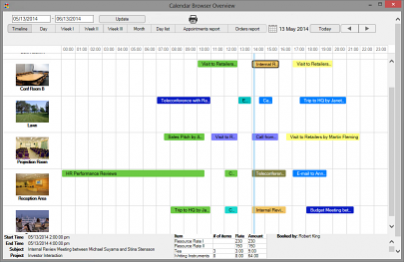
With Calendar Browser booking resources is as easy as making an appointment in the Outlook Calendar. Calendar Browser adds lots of features to any Outlook Calendar. Book resources and supplies with Outlook and Exchange server. Multiple calendars can be shown. Mark an appointment with a mandatory project name or add booking of services (coffe, notepads etc) to the booking. All features highly customizable. Source code available for purchase for complete control. WYSIWYG .html editor for resource descriptions with pictures etc. Also URL possible. Overview. Statistics. Win8, Office 2010 and 2013, 32- and 64-bit.
Free trial for 30 days without limitation on number of users/calendars etc.
Admin and User manuals downloadable from www.kalmstrom.com. Online video tutorials and documentation available. Subscription per organization incl. support and upgrades for all kalmstrom.com products, unlimited number of users.
About Calendar Browser
This Office Suites & Tools program is available in English, Danish, Finnish, French, German, Italian, Norwegian, Portuguese, Russian, Spanish, Swedish. It was last updated on 29 September, 2026. Calendar Browser is compatible with the following operating systems: Other, Windows.
The company that develops Calendar Browser is kalmstrom.com Business Solutions. The latest version released by its developer is 9.
The download we have available for Calendar Browser has a file size of 25.2 MB. Just click the green Download button above to start the downloading process. The program is listed on our website since 2014-06-24 and was downloaded 0 times. We have already checked if the download link is safe, however for your own protection we recommend that you scan the downloaded software with your antivirus. Your antivirus may detect the Calendar Browser as malware if the download link is broken.
How to install Calendar Browser on your Windows device:
- Click on the Download button on our website. This will start the download from the website of the developer.
- Once the Calendar Browser is downloaded click on it to start the setup process (assuming you are on a desktop computer).
- When the installation is finished you should be able to see and run the program.
Program Details
General
System requirements
Download information
Pricing
Version History
version 9
posted on 2014-06-24
Compatible with Win8 and Office 2013, 32 and 64-bit, Excel reports
version 6.0
posted on 2009-11-02
Much improved Overview, HTML or URL descriptions of resources, improved Archive for statistics, easier to work with projects.
Disclaimer
External Download
We do not host Calendar Browser on our servers. We did not scan it for viruses, adware, spyware or other type of malware. This app is hosted by the software publisher and passed their terms and conditions to be listed there. We recommend caution when installing it.
The external download link for Calendar Browser is provided to you by apps112.com without any warranties, representations or guarantees of any kind, so access it at your own risk.
If you have questions regarding this particular app contact the publisher directly. For questions about the functionalities of apps112.com contact us.
